What Is a Blade Server?
A blade server is a stripped-down computer that houses the CPU, memory, network connectivity, hard drives/SSD/NVMe, graphics, storage I/O and management.
It is designed to be energy and space efficient, allowing a business to scale its compute requirements as it grows, simply by adding another server blade into the blade chassis.
A blade server is essentially a modular sliver of server that can be populated with the necessary compute and added to the chassis to scale as and when required.
There are blades that are diskless, where storage resides on the SAN. This allows for a higher server density for compute using the CPU or GPU.
Due to the compartmented nature of a blade chassis, they tend to have a far higher supported lifespan than traditional rackmount servers.
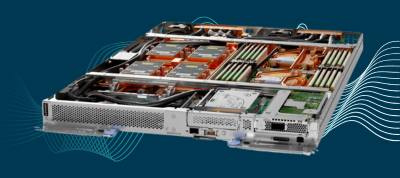
The Lenovo ThinkSystem SD650-N V2 Nodes is a dual-socket 6U rackmount server enclosure that supports the 3rd Gen Intel® Xeon® Scalable processors with NVIDIA HGX™ A100 4-GPU acceleration and NVIDIA HDR InfiniBand networking.
All Things Lenovo ThinkSystem SD650-N V2 Nodes →
Blade Server Design
A blade simply inserts into the blade chassis. The chassis interconnects with all the servers and houses the cooling, power, networking, storage I/O and management via a backplane. In simple terms, it is an empty shell to which you insert servers.
Advantages of a Blade Server
Below are some of the advantages of using a blade chassis over individual rackmount servers:
Reduced network complexity — Typically, 10 rackmount servers means 10 management connections. A blade server can house 10 servers and have a single management port for them all.
Reduced power consumption — Each rackmount server would normally have 2 PSUs, so 10 servers means 20 power leads. A blade chassis houses all the power it requires with just 4 power leads to run the whole chassis. There are also energy savings, since the power supplies are optimised to run more efficiently.
Reduced network traffic — Having multiple servers housed in a blade chassis means communication between the blade servers is contained within the chassis rather than broadcasting across the whole network.
Enhanced security — The blade chassis is a completely self-contained data centre, with all components housed in a modular chassis that can be rack mounted or floor standing. Due to the
design it is very easy to secure a server from outside attacks, as much of the compute and processing is done within the chassis.
Reduced cooling — A blade chassis is optimised and designed to cool multiple blade servers. This greatly reduces the number of fans required, as many components on a blade server are airflow optimised — for example, processors are mounted at the back of the server nearer to the fans.
Reduced expenditure — If a business is growing rapidly and the compute requirement over a 2–3 year period can be measured, then a blade server makes perfect financial sense. The biggest expenditure is the blade chassis to house the servers, so the upfront cost will be more than purchasing individual rackmount servers — however, once you start to scale beyond four or six servers, that upfront cost is recouped, along with all the savings mentioned above.
Physical space savings — A blade chassis is highly dense and compact: a 10U blade chassis can house up to 14 blades. 14
rack mount servers could easily take up 14U or 28U, depending on server size.
Fault tolerant — A blade chassis is designed to be fault tolerant, supporting failures of key components such as blade servers, switches, backplanes, power supplies, fans, data storage and I/O. If a blade fails, simply slide it out and replace it.
Greater support life — A blade chassis can be supported by the manufacturer for 10+ years, whereas a normal server is typically supported for 5 years.
Application Use Cases
As a chassis houses multiple blades, it is ideal for all the following applications:
- Virtualisation — powerful enough to run a virtual infrastructure to provide VMs for applications, or be used for VDI to deliver a virtual desktop environment
- Clustering — ideal for use with software applications such as Microsoft Cluster Server or VMware vSphere Cluster, which require multiple servers to create high-performance clusters
- A blade can run the same applications as a normal server
Limitations of Using a Blade Chassis
A chassis has many benefits over rackmount servers, but there are some limitations, as shown below:
- Pricing — the business needs to ensure the blade chassis will fill most of the empty blade slots and that the application(s) can take advantage of this type of configuration, for a decent ROI
- A blade server cannot be upgraded to support faster network speeds unless the backplane can handle it
- They suffer with limited data storage space, as most only support 1 or 2 drives
- If a software application requires a very high network or storage requirement, a rackmount server would be a better choice
- The network switch port density is less than a data centre switch
If you need some guidance in choosing a suitable blade server chassis for your requirement or application, we're here to help.
Weighing up blade servers vs rackmount for your environment? Talk to us for free, no-obligation advice.
Talk to a Specialist

