
Menu
JBOD stands for “Just a Bunch of Disks”. The drives sit in one enclosure and your server sees them individually, with no built-in data protection. Here is how it works, how it compares with RAID, and when it makes sense.
JBOD means “Just a Bunch of Disks”: a collection of drives in one enclosure or system, with no RAID applied by the hardware.
In a JBOD, the drives are either treated as independent disks or spanned together into one large logical volume. Either way, the enclosure itself adds no redundancy. If a drive is lost, its data is lost unless you have protected it some other way.
That is the trade-off. JBOD gives you all the raw capacity at a lower cost and with simple expansion, and it leaves data protection to your software, your RAID controller or your backups.
In short: JBOD is about capacity and flexibility. RAID is about protection and speed. Many organisations use both in the same environment.
A JBOD enclosure holds a number of drive bays and connects to your server over SAS. To the host, the enclosure gives access to each disk individually, over 6Gb/s or 12Gb/s SAS.
The same enclosure can hold both solid-state drives and hard disks. Your server then uses software, a SAS controller or a SAS RAID controller to decide what to do with them: present them one by one, or build RAID levels from the drives in the JBOD.
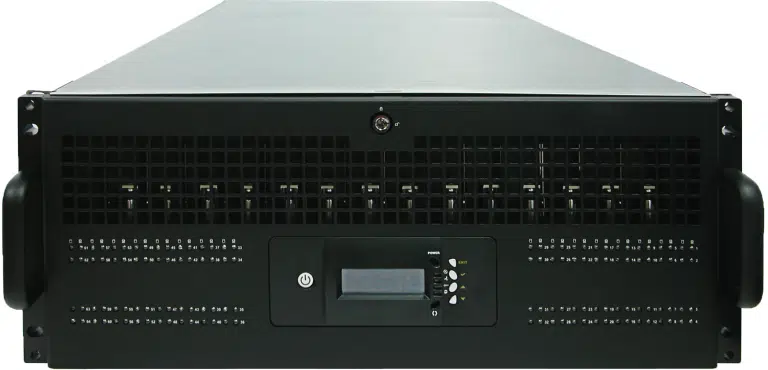
Depending on the model, an enclosure has one or two SAS controllers. Dual controllers allow enclosures to be daisy chained and let you share storage between hosts, each with access to its own drives.
Enclosures can be daisy-chained to add more drives as you grow. Ask us for the right setup for your capacity.
A JBOD gives no protection against drive failure unless a RAID controller or your software provides it, for example by writing data more than once across several enclosures.
This is why more software now uses software RAID rather than hardware RAID. It is easier for software to read individual drives in a JBOD and build its own protection than to write a driver for every RAID controller on the market.
RAID combines drives to protect data or increase speed, and usually shows the operating system a single disk. JBOD does neither by default. This table sets out the main differences.
| JBOD | RAID | |
|---|---|---|
| How drives appear | Each drive is shown separately, or spanned into one volume | Drives are combined and usually appear as a single disk |
| Data protection | None built in | RAID 1, 5, 6 and 10 protect data with mirroring or parity. RAID 0 does not |
| Speed | No boost. Each drive runs at its own speed | Striping can raise performance. RAID generally performs better |
| Usable capacity | All of it. Ten 10TB drives give about 100TB | Some capacity goes on redundancy. RAID 10 uses half |
| If a drive fails | Independent drives: only that drive’s data is at risk | RAID 5 can rebuild after one failure and RAID 6 after two. In RAID 0, one failure loses everything |
| Cost and complexity | Usually cheaper, with no specialised controller needed | Needs a RAID controller or software RAID, and extra drives for redundancy |
| Best suited to | Large archives, secondary storage and software-defined storage | Mission-critical systems such as databases |
You do not have to choose one or the other. You can connect a JBOD to a storage networking or server setup and add RAID levels through a SAS RAID controller, or let your software build the protection.
Plan the protection first. Whatever you choose, treat JBOD capacity as unprotected until you have decided how it will be protected and backed up.
Windows Server can use JBOD enclosures with Storage Spaces, where resilience is set in software rather than by a RAID controller. Microsoft’s guidance for Storage Spaces is specific about the hardware:
How many drives you need depends on the resiliency type you choose:
| Resiliency | Minimum drives | What it means |
|---|---|---|
| Simple | 1 | No protection from drive failure |
| Mirror | 2 (5 to survive two failures) | Protects against a single drive failure with two drives |
| Parity | 3 | Protects against a single drive failure, suited to sequential workloads such as archive or backup |
Storage Spaces Direct is different. Microsoft does not support shared SAS enclosures connected to multiple servers for Storage Spaces Direct, and an external JBOD is supported only when it is connected to one server. If you are planning that design, read our guide to Storage Spaces Direct first.
We supply a complete range of JBOD enclosures, from 12-bay through to 80-bay. They are suited to software-defined storage, hyper-converged infrastructure, Windows Server software RAID and large-scale data workloads.
Ask us for enclosures certified for Windows Server, VMware or DataCore.
We can advise on a suitable JBOD for your requirement, including whether you need single or dual SAS controllers for expansion.
Tell us what you are storing, the hosts and software involved, and how much you expect to grow. We will recommend a configuration.
Just a Bunch of Disks. It describes a set of drives in one enclosure or system that are not combined by RAID.
No. RAID combines drives to protect data or increase speed. JBOD does not protect data or boost performance on its own, although you can add RAID to a JBOD through a controller or software.
Not by itself. If a drive fails, the data on it is lost unless a RAID controller, your software or a backup protects it. Spanned volumes are not fault tolerant.
No. JBOD gives no speed boost, because each drive runs at its own speed. RAID generally performs better.
Yes, using Storage Spaces. Microsoft recommends a simple HBA, or a RAID-capable HBA in non-RAID mode, and an enclosure certified for Storage Spaces.
No. A JBOD connects through a SAS controller and your software can build the protection. A SAS RAID controller is an option if you want hardware RAID levels on the same drives.
Yes. Our JBOD enclosures support both solid-state drives and hard disks in the same enclosure.
Our enclosures range from 12 to 80 bays. Enclosures can be daisy-chained to add more drives as you grow. Ask us for the right setup for your capacity.
Speak to a specialist about enclosure size, drive types and how to protect the data. We will talk you through the options.
Prefer email? Write to solutions@data-storage.uk.
